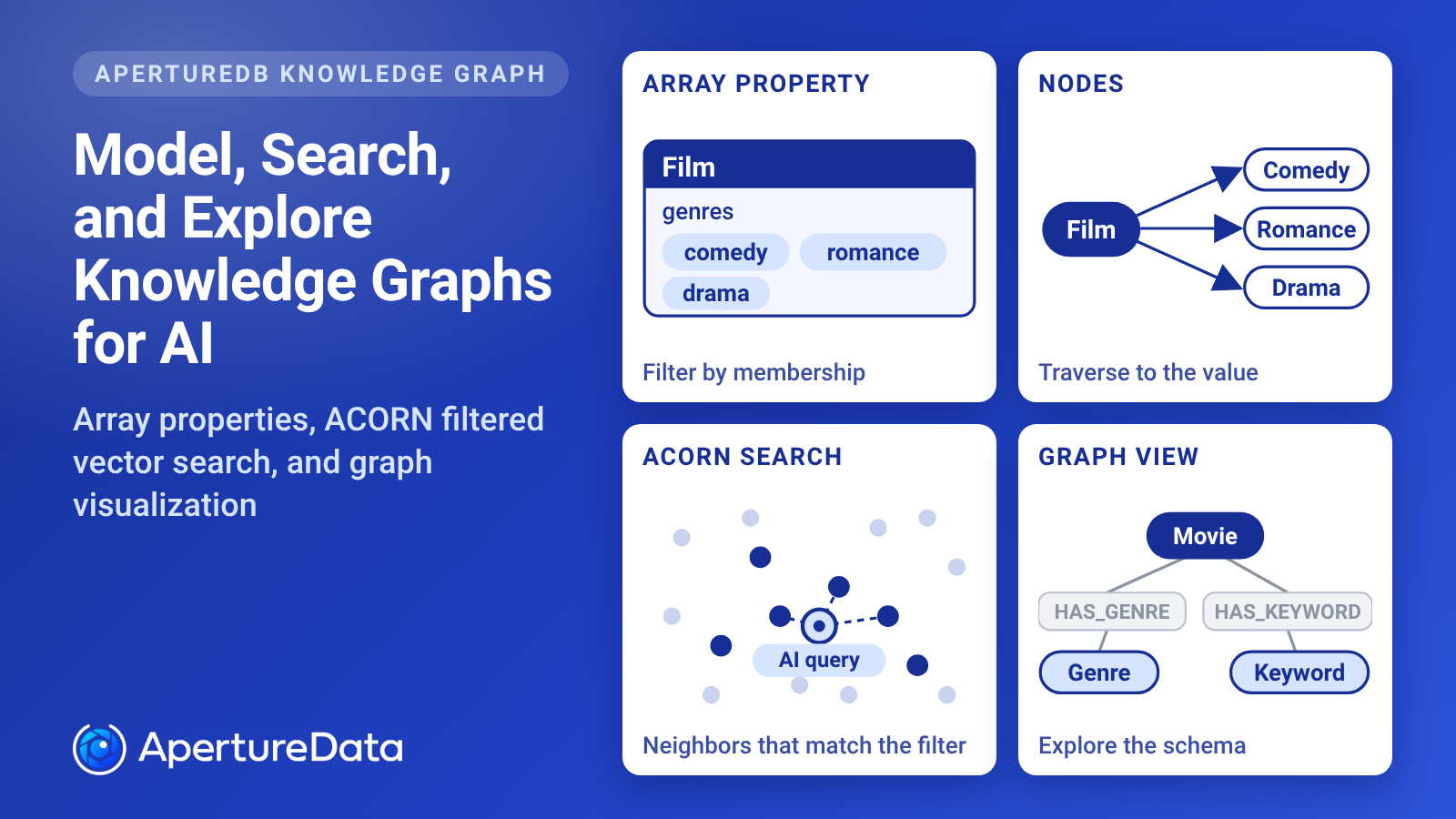


Working with a knowledge graph comes down to three jobs: modeling the data, searching it, and exploring it. AI search and retrieval applications depend on all three, and agentic search builds on the same foundation. This post covers what is new in ApertureDB for each. Array properties help you model multi-valued data such as genres and tags. ACORN adds filtered vector search with property, label, and relationship constraints. The Graph page in the UI lets you explore the schema, the properties, and the stored media.
Modeling starts with a common question: nodes or attributes? In short, use an array property when the values are labels you filter on, and a node when you want to traverse to the value or describe it. The post also covers several query additions. It is the companion to our post on text features: Embracing Text as a Truly First-Class Modality in ApertureDB, Finally.
Why These Features: Multi-Valued Properties, Filtered Search, and Seeing the Graph in Media, Retail, and AI-Native Applications
We have been lucky to work with customers such as Home Depot, Gracenote (a Nielsen company), Fanatics, Badger Technologies (a Jabil company), iSonic.ai, and others. Their work spans recommendations, personalization, customer support, semantic search over video, computer vision, knowledge graphs, and most recently, agentic memory and cognition. The needs behind this release look the same in media, retail, and AI-native applications.
Multi-valued properties. A film belongs to several genres. A retail product comes in several sizes and colors. A document or an agent’s memory carries several topic tags. Modeling each value as a node gives you something to traverse, but it adds an edge for every item. Keeping the values on the item works only if a property can hold more than one value and still be filtered and indexed.
Filtered vector search with relationships. Someone wants films whose posters look like one they love, but only comedies that share an actor with a film they rated highly. A shopper wants products that look like a photo, but only those in stock, in their size, and from brands tied to the category they are browsing. An agent wants the documents closest to its question, but only those the user may see and that relate to the task. Each one combines a property, a label, and a relationship in the same search. This works best when the filter takes part in the vector search itself instead of being applied afterward.
Seeing the shape of the graph. A media catalog links films to genres, keywords, cast, and posters. A retail catalog links products to brands, categories, and images. An agent’s memory links tasks to memories, documents, and embeddings. As the number of classes grows, a list of names no longer shows how they connect. Seeing the classes, their connections, and the objects inside them helps you check that the data is modeled the way you meant.
Questions that start from a set of objects. For each of five actors, show the three most recent films. For each of ten brands, show the three newest products. For each of several teams, show their most recent documents. Grouping by source answers these. Connection endpoints answer the reverse: which objects sit at the end of connections the query already found.
Nodes or Attributes: Modeling Genres, Tags, and Other Multi-Valued Properties
Movie genres are the classic example. A film can be a comedy, a romance, and a drama at once. Would you express that as a Genre node with an edge from every film, or as an attribute on the film? A retail product with several sizes and colors, or a document with several topic tags, raises the same question.
Nodes give you relationships to traverse, but a popular genre can end up with many edges. An attribute keeps the genre on the film itself. The tradeoff gets more interesting if you want to add weights, such as how strongly a film belongs to each genre.
Which variation works better depends on your use case. If you want to figure out which one fits yours, talk to us at team@aperturedata.io.
Array Properties: Native Arrays With Filters and Indexes
ApertureDB did not have array properties before. We added native array properties so the attribute option is there when it fits.
A property can hold an array of numbers, strings, booleans, datetimes, or nulls. You can filter an array by membership with in and not_in, by position with at, by length with count, and by equality, which compares the whole array including order. Array indexes can speed up membership, selected-element, length, and whole-array equality queries. See constraints and CreateIndex in the docs.
Array Property or Node: How to Choose for Tags, Genres, and Other Multi-Valued Data
Use an array property when the values are labels you filter on. Genres, tags, and keywords on a film fit this. You ask for films tagged comedy, or films with more than one tag, and the values do not need relationships of their own. Membership filters and array indexes serve that, and no node or edge is created per value.
Use a node when the value is something you want to traverse to or describe. Model the value as a node if you want to go from a genre to every film in it, connect genres to other data such as awards or critics, or record how strongly a film belongs to a genre. A connection can carry its own properties, so a weight sits on the edge. An array element is a plain value and cannot carry properties of its own.
Nodes cost edges. A popular genre node connects to every film in it, and that is the price of being able to traverse from the genre. The two are not exclusive. A film can keep an array of tags for filtering while the values you traverse live as nodes.
ACORN: Filtered Vector Search With Property, Label, and Relationship Constraints
ApertureDB now supports ACORN-based filtered vector search. ACORN comes from the SIGMOD 2024 paper by Patel et al., “ACORN: Performant and Predicate-Agnostic Search Over Vector Embeddings and Structured Data.” The paper covers searching vector embeddings together with structured data such as attributes and keywords. In ApertureDB, ACORN uses the HNSW graph to find neighbors that satisfy property, label, and relationship constraints. This can improve the performance of filtered searches.
ACORN is opt-in. With constraints, the default search computes exact nearest neighbors among the matching descriptors, and ACORN is the approximate alternative. Set filtered_knn to true on a descriptor search that uses the HNSW engine and sets k_neighbors. See the FindDescriptor docs for the details and an example.
Because neighbor selection is approximate, results can differ from the default search. A query can also return fewer than k_neighbors results even when enough descriptors match. ACORN also cannot be combined with knn_first or indexed_results_only.
Choose ACORN when a filtered search is the slow part and approximate neighbors are acceptable. Keep the default when you need exact results.
Graph Visualization: Exploring Node Classes, Connection Classes, Properties, and Media in the ApertureDB UI
The ApertureDB UI has a Graph page that draws the schema of your database as a graph. Each node class and connection class is a box, with its number of objects or connections beneath the name. This movie dataset has 13 node classes and 14 connection classes. Genres are modeled as nodes: a Genre class of 25 objects, linked to about 4.8K movies by about 12.2K HAS_GENRE connections.
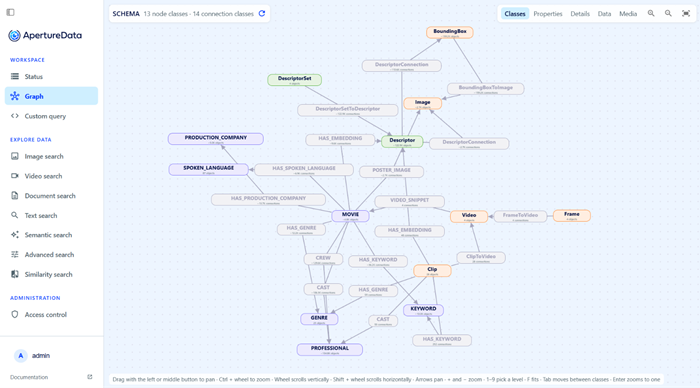
Alt text: ApertureDB UI Graph page in the Classes view, showing the schema of a movie dataset with 13 node classes and 14 connection classes. Movie connects to Genre, Keyword, Professional, Production Company, and Spoken Language nodes and, through connections such as POSTER_IMAGE and VIDEO_SNIPPET, to Image, Video, and Descriptor classes.
The Properties view lists the properties of each class, so you can see how a dataset is modeled before you write a query. The Details view shows information such as counts and property types, and the Data view shows attribute values. Here the Movie class carries properties such as budget, overview, popularity, poster_url, and tagline, and the Descriptor class carries source and title.
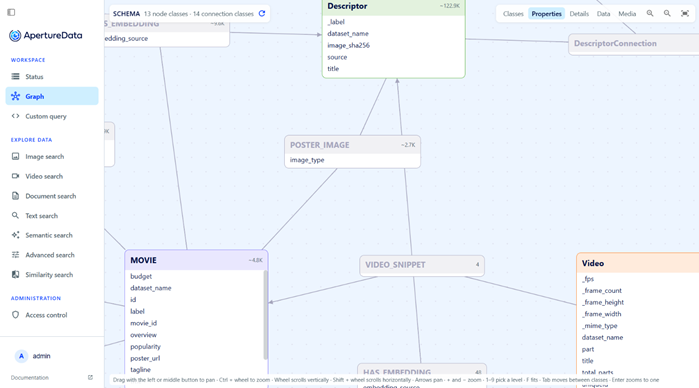
Alt text: ApertureDB UI Graph page in the Properties view, with the Movie class expanded to list properties including budget, overview, popularity, poster_url, and tagline, next to the Descriptor, Poster Image, and Video classes.
The Media view shows the images, clips, documents, and other objects stored in a class, next to their properties. Here the Clip class shows six of its 28 clips, with properties such as _uniqueid, _label, and _range_start. Click a thumbnail to open the stored object, so you can see what the data is while you navigate the graph.
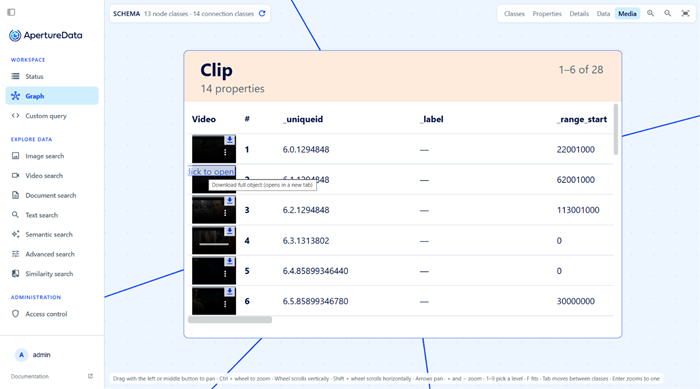
Alt text: ApertureDB UI Graph page in the Media view, showing thumbnails of six of the 28 Clip objects in a table with properties such as _uniqueid, _label, and _range_start.
More Knowledge Graph Queries: Grouping by Source, Connection Endpoints, and Faster Connection Reads
Recent releases added more for knowledge graph queries:
• Grouping of results by source. When is_connected_to is used in a Find command, group_by_source groups the connected objects by their source entity, and per_group applies sorting, offset, and limit to each group. See group_by_source and per_group.
• is_endpoint_of, which finds objects at the endpoints of connections selected earlier in the same transaction. More on it below.
• Faster reading of connections.
is_endpoint_of: Finding Objects at the Ends of Connections
is_endpoint_of restricts a Find command to the endpoints of connections that were selected earlier in the same transaction. It differs from is_connected_to, where ref points to objects. Here ref points to connections. Set direction to out for the source, in for the destination, or any for both. Add connection_class or constraints to narrow which connections count. To combine several conditions, put them in all to require every one, or in any to accept either.
This query finds the people who are the source of a Knows connection and also the destination of a connection with a since_year of 2020 or later. The refs 3 and 4 point to connections selected earlier in the transaction:
{
  "FindEntity": {
    "with_class": "Person",
    "is_endpoint_of": {
      "all": [
        { "ref": 3, "direction": "out", "connection_class": "Knows" },
        { "ref": 4, "direction": "in", "constraints": ["$since_year", ">=", 2020] }
      ]
    },
    "results": { "list": ["name"] }
  }
}
In the docs example, Jane knows John, and Alice has known Jane since 2021. Only Jane meets both conditions, so she is the one returned. See is_endpoint_of in the docs.
Why This Matters: Relationships, Attributes, and Vectors in One Database
Knowledge graph features matter most when they work with the rest of your data. Array properties and filtered vector search let a single query combine relationships, attributes, and embeddings. The text features in our companion post add search over the text itself. Together they are the building blocks of AI search and retrieval, and agentic search uses the same ones.
On the graph side, ApertureDB serves lookups on billion-scale graphs in about 15 ms, and it is 2 to 30x faster than a leading graph database, depending on query complexity.
The same combination matters for agent memory. A memory is not only a piece of text that looks similar to a question. An agent also needs to know how one memory relates to another and which ones apply to the question at hand. Aperture Nexus extends ApertureDB into a memory layer for AI agents, and it relies on the knowledge graph underneath. Each memory carries its context, and contexts are linked with named relationships such as follows, caused_by, and references. Because ApertureDB stores relationships as first-class data, vector search finds the related memories and the graph shows how they connect. We have written before about why graph structure, not window size, gives AI systems memory.
Repo: https://github.com/aperture-data/aperture-nexus
Docs: ApertureDB query language overview and release notes. Try ApertureDB free: https://aperturedata.io/product